Page 1 of 1
False Positives on Transparency Preflights
Posted: Thu Feb 12, 2026 4:21 am
by wwstudios
I'm using a Switch Pitstop configurator element with a preflight profile that has one transparency check, which is to check if 'Graphic element is transparent' (see screenshot).
These files have no spot colors and no images. All vector. When transparency is found, it routes the offending files out of the flow until someone can look at them.
However, it is routing PDF files that don't *appear* to have any transparency in them.
When I open the PDF in Acrobat and check the flattener it doesn't show any transparency.
The same is true for when I open the PDF in Illustrator. The flattener preview shows no transparency.
But I send the file back through and it gets flagged again. I send it to print manually and then it prints just fine.
When I check the log file it could sometimes give me a clue by listing that transparency was found 'x' number of times on 'x' pages.
Then I could see the elements that repeated 'x' many times. For example one was a logo.
I removed the logo and sent it back through. This time it goes through with no transparency found.
Checking the logo again - I see no transparency reported in Acrobat or Illustrator. Very confusing.
Then I go back to Illustrator, take the logo and run the Flatten Transparency feature on it, which appears to have absolutely no effect. But now it goes successfully through the preflight check in Switch as if I just got rid of transparency??
On thing I did see, but don't now if this is a clue, is that not all of the colors used were in the Swatches panel. I used 'Add used colors' from the Swatches flyout menu to add them back, but this did not appear to affect anything. There were no spots added, only global process colors.
What could be the issue here?
Re: False Positives on Transparency Preflights
Posted: Thu Feb 12, 2026 8:53 am
by freddyp
I have a suspicion, but I would like to see the file. Can you share it?
Re: False Positives on Transparency Preflights
Posted: Thu Feb 12, 2026 3:49 pm
by wwstudios
Sure I can share it, but what is the best way to provide it to you?
I don't want to post it directly in this thread but I can send it some other way
Re: False Positives on Transparency Preflights
Posted: Thu Feb 12, 2026 3:53 pm
by freddyp
You can send it to me directly:
freddyp@enfocus.com. I will of course post the result of my findings here for everybody.
Re: False Positives on Transparency Preflights
Posted: Thu Feb 12, 2026 3:58 pm
by wwstudios
Ok great I just sent it!
Re: False Positives on Transparency Preflights
Posted: Fri Feb 13, 2026 9:58 am
by freddyp
It was what I expected: the file contains forms that are transparency groups. Forms (not the interactive kind with fields and checkboxes, etc.) are a way of grouping objects, and the special thing is that these forms have properties themselves independent of the properties of the objects inside the form, but with a real impact on the objects inside the form. And one of the properties is if the form is a transparency group or not. That is why this is flagged by the preflight check.
The easiest way to see this is to use the combination of the Object Browser and the Inspector. In the Object Browser you can select only the form and then you can see in the transparency settings part of the Inspector if the form is a transparency group, if it is an isolated form, if it is a knockout form and if it has a blending color space. This topic has already been discussed in one of the monthly workshops but it is probably a good idea to repeat this.
Conclusion: theoretically speaking the warning/error is correct. But there is a but: the blend mode of the transparency group is "Normal" and not "HardLight", "ColorDodge" or one of the other 78 mostly incomprehensible blend modes. You could therefore argue that such a form should not be reported. I would argue that the application that creates the PDF should not set the transparency flag on a form if the form has no special blend mode.
Are you still there? A page can also be a transparency group so that will also cause a warning/error message. Pages do not have blend modes (phew) so you can remove the transparency group setting. Usually. Pages can have a blending color space and if that is not CMYK you are also in for a surprise if you remove the setting.
Attached is an Action List that logs forms with a "real" blend mode, logs "normal" objects with a blend mode and removes the transparency group setting of pages that do not require it.
Re: False Positives on Transparency Preflights
Posted: Fri Feb 13, 2026 2:39 pm
by magnussandstrom
Thanks Freddy, this was very helpful!
I implemented your Action list to our standard preflight workflow. In this workflow we check for transparency when a PDF is not a PDF/X and/or contains wanted spot colors, if transparency is found we flatten the PDF before further processing. This will for sure give us fewer false positives.
Re: False Positives on Transparency Preflights
Posted: Fri Feb 13, 2026 9:50 pm
by wwstudios
Ok thanks much - I'm just glad I was not crazy! I appreciate the explanation, it really helps.
Two things:
1. In Acrobat, which Object Browser and Inspector are we talking about? Is it through the Preflight panels? Or the Object Inspector in the Output Preview window?
2. In Illustrator, it seems flattening the logo again got rid of the transparency groups, but how can I avoid this in the future at the Illustrator stage? I'm not quite sure how those were created or left behind.
Re: False Positives on Transparency Preflights
Posted: Mon Feb 16, 2026 9:08 am
by freddyp
1. In Acrobat, which Object Browser and Inspector are we talking about?
I wrongly assumed it was obvious I was referring to PitStop Pro.
2. In Illustrator, it seems flattening the logo again got rid of the transparency groups
Ah, you are editing your PDFs in Illustrator. You should read this post from Dov Isaacs, former Adobe Principal Scientist:
https://community.adobe.com/questions-6 ... ost2720095
It is a long and dense post, so let me quote one sentence that I think summarizes it best:
Simply stated, Adobe Illustrator is not, repeat is not, repeat yet again is not a general purpose PDF file editor.
Re: False Positives on Transparency Preflights
Posted: Tue Feb 17, 2026 1:54 am
by wwstudios
Ok, that clears that up. We actually don't have Pitstop Pro here, only Pitstop Server, so I can't really check it in there.
I'm going to request a license of Pro so I can check files if necessary.
I am familiar with Dov Isaac's words on this topic, and I fully agree. I don't edit the PDFs back in Illustrator, but the original files are all Illustrator templates - '.ai' files, not the '.ait' files.
So I did flatten the logo in there again (it had already been flattened once), and re-saved out a PDF and it worked then. I was just hoping there was some clear way to always flatten the Illustrator template correctly so this doesn't happen. There's definitely something different happening with the flattening on some of the files.
Re: False Positives on Transparency Preflights
Posted: Thu Feb 26, 2026 3:52 pm
by magnussandstrom
freddyp wrote: ↑Fri Feb 13, 2026 9:58 am
Attached is an Action List that logs forms with a "real" blend mode, logs "normal" objects with a blend mode and removes the transparency group setting of pages that do not require it.
Unfortunatly the action list also seems to remove transparency settings that are required:
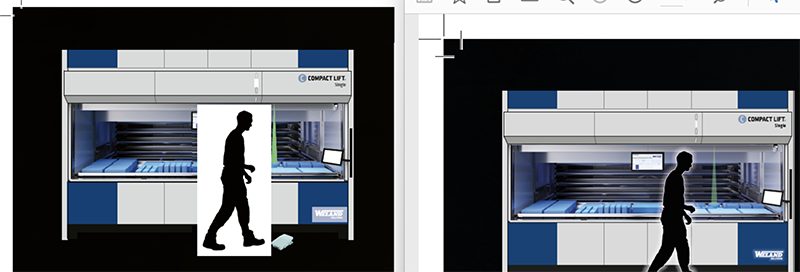
- transparency_error.png (123.26 KiB) Viewed 22781 times
Example-file:
https://tinyurl.com/3fzdmefn
Re: False Positives on Transparency Preflights
Posted: Thu Feb 26, 2026 4:43 pm
by loicaigon
Don't you prefer that version

Re: False Positives on Transparency Preflights
Posted: Fri Feb 27, 2026 2:17 pm
by loicaigon
Hi Magnus,
After looking at it, I think that one possible adjustment is to discard pages that actually contains transparent objects. That way you only consider pages without transparent objects when removing the Transparency Group Settings.
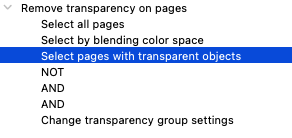
- Screenshot 2026-02-27 at 14.18.59.png (13.06 KiB) Viewed 22704 times
If I run on your file, I don't see the problem you did report anymore.
Can you have a look?
