Page 1 of 1
Selecting Page 2 for an action to run
Posted: Fri Feb 13, 2026 6:35 pm
by SBLESS
Hi
I have a 2 page pdf that I need to enlarge by 2.5mm all round.
This works on both pages, no problem.
I then need to select page 2 and add a 0.25mm keline around the media box then flip the whole of page 2.
The action I have will not isolate page 2. it flips page 1 as well.
Any ideas why?
Thanks
Steve
Re: Selecting Page 2 for an action to run
Posted: Fri Feb 13, 2026 10:02 pm
by loicaigon
Select pages > Page range > 2
Flip content
Add Object > Rectangle using mediabox as dimensions
Couldn't that work?
Re: Selecting Page 2 for an action to run
Posted: Tue Feb 17, 2026 4:16 pm
by SBLESS
No, it selects both pages.
That action is what I have been trying.
In order to get around the problem I run the action on the selected page and not full document.
It would be good to have just one action list though.
Re: Selecting Page 2 for an action to run
Posted: Tue Feb 17, 2026 6:40 pm
by loicaigon
Hi
Not sure what's wrong your place but feel free to contact support anyway.
Here I believe it produces the expected result:
Before

- Screenshot 2026-02-17 at 18.36.56.png (192.27 KiB) Viewed 7008 times
The Action
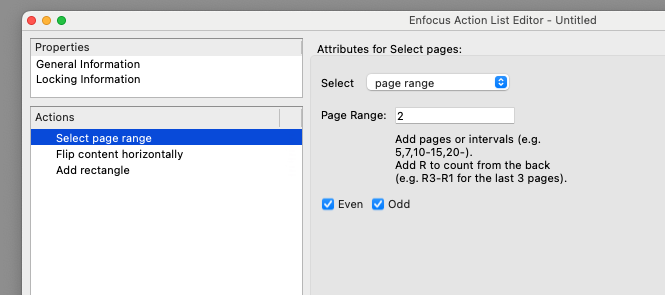
- Screenshot 2026-02-17 at 18.37.06.png (38.49 KiB) Viewed 7008 times
The result
- Screenshot 2026-02-17 at 18.37.06.png (38.49 KiB) Viewed 7008 times
Re: Selecting Page 2 for an action to run
Posted: Mon Feb 23, 2026 12:41 pm
by SBLESS
Hi, sorry for the late reply.
For some reason it now works.
I must have been doing something wrong.
Thanks for your help
If you need me to post the action, I will.