Page 1 of 1
Best practice for resizing and adding bleed
Posted: Fri Mar 06, 2026 10:20 am
by DJS
Hello,
Could anyone suggest the best action list/smart preflight to take a file, resize it to a defined size (not variable and always portrait) and add 3mm bleed.
I can get it working to a degree, but, for some reason, bleed isn't being added to all edges, or bleed gets added but the file does not resize
Thank you
Re: Best practice for resizing and adding bleed
Posted: Fri Mar 06, 2026 10:42 am
by loicaigon
Hi,
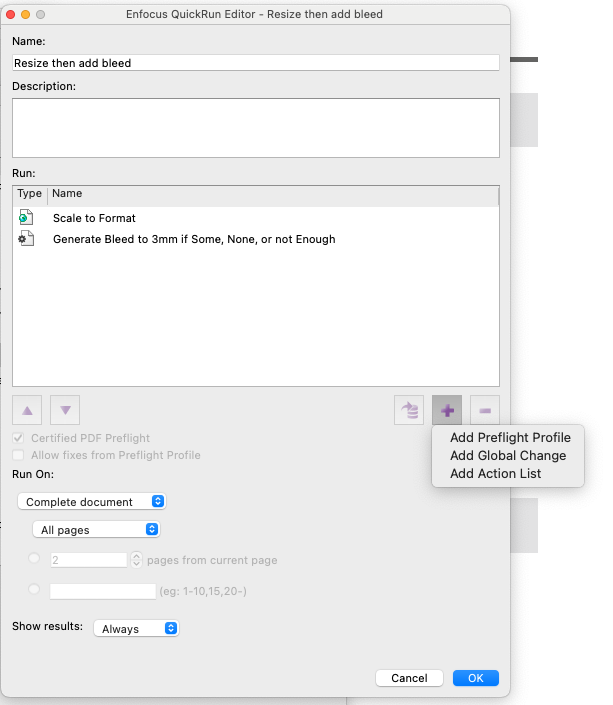
There are default Global Changes and Action Lists in PiTStop that will do just that.
You can even create a new Action List, record execution and run the default resources.
Or simply import them.
Also a quick run can be thought about.
- Screenshot 2026-03-06 at 10.44.30.png (78.19 KiB) Viewed 5264 times
When bleed isn't added on all edges, it's most of the times because the content next to the trim is slightly out of the detection range. By Default detection is 0.01mm, so if content is 0.011mm away from the trim, it won't be considered for bleed generation.
An easy fix is to increase the value to something like 0.1 for example.
What is the correct value? The bigger value you set, then the more chances are that you stretch objects which shouldn't.
Re: Best practice for resizing and adding bleed
Posted: Thu Apr 09, 2026 4:55 pm
by DJS
Thank you so much, sadly I am still struggling to create an action that checks a pdf is A5, if it is and has bleed then leave as it, if it does not have bleed add 3mm bleed, and if not A5 then resize and make sure that has 3mm bleed... this should be possible?
Re: Best practice for resizing and adding bleed
Posted: Thu Apr 09, 2026 4:55 pm
by DJS
Needs to be able to be included in a PPP, is a quickrun importable into a PPP?
Re: Best practice for resizing and adding bleed
Posted: Fri Apr 10, 2026 11:52 am
by loicaigon
Hi,
No you cannot just import a Quick run inside a Preflight Profile. However, it is only possible to add Extra Actions.